|
|
| (476 intermediate revisions by 10 users not shown) |
| Line 1: |
Line 1: |
| Phidgets are designed to run on Windows 2000 or newer. On Windows, Phidgets can be either plugged directly into a USB Port or run over a network using the [[#Webservice | Webservice]]. | | <metadesc>Communicate over USB with sensors, controllers and relays with Phidgets! Program in Windows using a wide variety of programming languages.</metadesc> |
| | [[Category:OS]] |
|
| |
|
| ==Getting Started== | | ==Quick Downloads== |
| | Our libraries support Windows 8 and newer. |
|
| |
|
| Before choosing a language below, you should have installed the '''Core Drivers''' and confirmed that your Phidget works.
| | *[https://cdn.phidgets.com/downloads/phidget22/libraries/windows/Phidget22-x64.exe Installer Download (64-bit)] |
| | *[https://cdn.phidgets.com/downloads/phidget22/libraries/windows/Phidget22-ARM64.exe Installer Download (ARM64)] |
| | *[https://cdn.phidgets.com/downloads/phidget22/libraries/windows/Phidget22-x86.exe Installer Download (32-bit)] |
|
| |
|
| You can find the drivers and instructions in the Getting Started guide <span style="color:red;">for your specific Phidget device</span>.
| | ===Other Resources=== |
| | * [[OS - Windows Advanced Information|Windows Advanced Information]] |
| | *[https://cdn.phidgets.com/downloads/phidget22/libraries/windows/Phidget22-windevel.zip Windows Development Files] |
| | * [https://www.phidgets.com/downloads/phidget22/libraries/windows/ Previous Releases] |
|
| |
|
| ==Recommended Languages== | | ==Getting Started with Windows== |
| | ===Install=== |
| | To get started, download the appropriate [[#Quick Downloads|installer]] for your machine from the list above. This will install the Phidget Control Panel and the Phidget Network Server. These are powerful tools that will help you develop your Phidget applications. |
|
| |
|
| After you have installed the Core Drivers, you should pick a programming language, install libraries, and run the examples for that specific language. | | ===Phidget Control Panel=== |
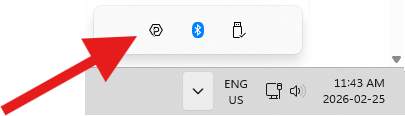
| | After installing, you can find the application through your system tray, or by opening the start menu and searching for ''Phidget Control Panel''. |
|
| |
|
| On Windows, we recommend the following languages:
| |
|
| |
|
| *[[Language - C Sharp|C#]]
| | [[Image:Os_windows_systemtray.png|link=|center]] |
| *[[Language - C|C/C++]]
| |
| *[[Language - Flash AS3|Flash AS3]]
| |
| *[[Language - Java|Java]]
| |
| *[[Language - LabView|LabView]]
| |
| *[[Language - Max/MSP|Max/MSP]]
| |
| *[[Language - Python|Python]]
| |
| *[[Language - VB.NET|Visual Basic .NET]]
| |
| *[[Language - VB6|Visual Basic 6.0]]
| |
|
| |
|
| You can also use these languages, but they do not support [[General Phidget Programming#Event Driven Code | event driven code]]:
| |
|
| |
|
| *[[Language - MATLAB|MATLAB]]
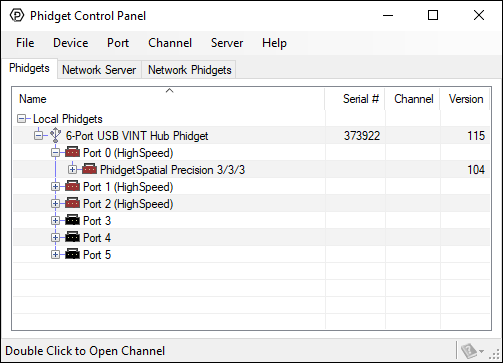
| | After opening, you will see all the Phidgets that are plugged into your machine, as well as any Phidgets that are on your network. |
|
| |
|
| ==Webservice==
| |
|
| |
|
| Drivers for the Phidget Webservice are already included in the Core Drivers that you installed in the Getting Started guide <span style="color:red;">for your specific Phidget Device</span>.
| | [[File:Windows ControlPanel General.PNG|link=|alt=Windows Control Panel General|center]] |
|
| |
|
| We also provide general information about using the [[Phidget Webservice]].
| |
|
| |
|
| ==Common Problems and Solutions==
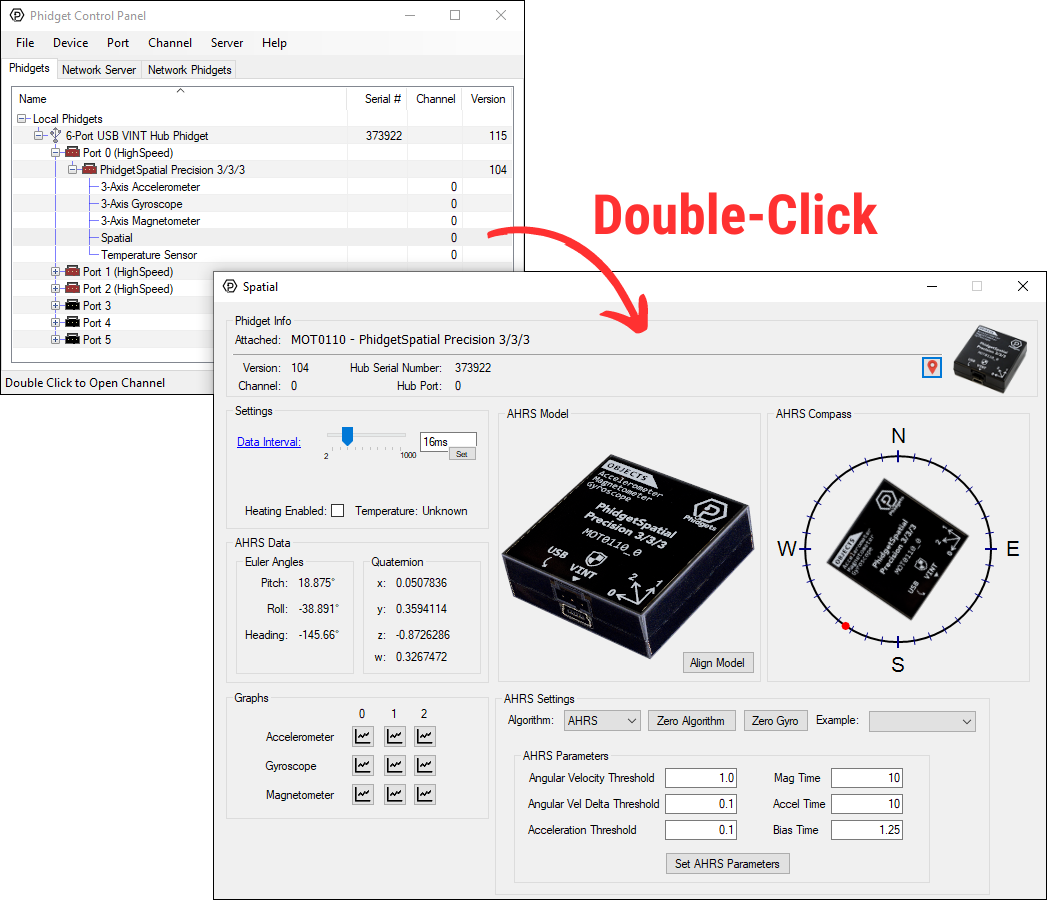
| | Click on the '''+''' beside a device to expand it so that you can see all available channels. Double-click on one of these channels to open up a window that lets you interact with it. |
| ===Issue: Installing .NET 2.0 on Windows 2000.===
| |
| Affected Operating Systems: '''Windows 2000'''
| |
|
| |
|
| To install the Phidget Framework on Windows 2000 systems, the .NET 2.0 framework is required.
| |
| Also, although not explicitly required to use Phidgets on a Windows system, Phidgets under the .NET languages can use .NET 2.0.
| |
|
| |
|
| Solution: The Microsoft .NET Framework Version 2.0 Redistributable Package for (x86) and (x64)
| | [[File:Controlpanel_openapplication.png|500px|link=https://cdn.phidgets.com/docs/images/b/bd/Controlpanel_openapplication.png|alt=Windows Control Panel General|center]] |
| systems is freely available from www.microsoft.com. You will need to upgrade to at least Windows
| |
| 2000 Service Pack 3 for the (x86) version.
| |
|
| |
|
| ===Issue: A corrupt installation fails on removal or repair===
| |
| Affected Operating Systems: '''Windows'''
| |
|
| |
|
| Solution: In Windows, if the normal uninstall fails then the Phidget Framework can be manually
| | The Phidget Control Panel can be used for testing devices, updating firmware, enabling a Phidget Network Server, and more. Visit the [[Phidget Control Panel|Phidget Control Panel page]] for more information. |
| uninstalled by following these steps:
| |
| # Delete C:\Program Files\Phidgets\
| |
| # Remove the Phidgets key from the Registry [-HKEY_LOCAL_MACHINE\SYSTEM\CurrentControlSet\Services PhidgetWebservice21].
| |
|
| |
|
| In most cases this is enough to get the installer working again. If you need to remove all traces of
| | ===Programming=== |
| the Phidgets libraries manually without using the uninstaller:
| | When you are ready to develop your own applications, visit our [{{SERVER}}/docs/Programming_Resources programming resources page] and select your programming language to get started. |
| # Shut down any programs using the Phidget libraries, including the webservice and the Phidget Control Panel.
| |
| # Unregister the COM library: regsvr32 /u “C:\Program Files\Phidgets\Phidget21COM.dll”
| |
| # Remove Phidget21.NET and Policy.2.1.Phidget21.NET from C:\Windows\Assembly\
| |
| # Delete ‘C:\Documents and Settings\All Users\Application Data\Phidgets’ (WindowsXP) or ‘C:\Users\All Users\Phidgets’ (Vista).
| |
| # Delete C:\Windows\system32\phidget21.dll
| |
| # Delete Phidgets from the start menu
| |
| # Delete C:\Program Files\Phidgets
| |
| # Search for and remove keys mentioning Phidgets from the registry in the following locations:
| |
| :* [HKEY_LOCAL_MACHINE\SOFTWARE\Microsoft\Windows\CurrentVersion\Uninstall\]
| |
| :* [HKEY_LOCAL_MACHINE\SOFTWARE\Classes\Installer\Products\]
| |
| :* [HKEY_LOCAL_MACHINE\SOFTWARE\Microsoft\.NETFramework\AssemblyFolders\Phidgets Inc]
| |
| :* [HKEY_CURRENT_USER\Software\Microsoft\Windows\CurrentVersion\Run\Phidget21Manager]
| |
| :* [HKEY_LOCAL_MACHINE\SOFTWARE\Classes\Installer\Assemblies\Global\]
| |
|
| |
|
| :9. Reboot
| | ==Software License== |
| | | By downloading the installer and/or development files, you agree to adhere to the terms of the [{{SERVER}}/documentation/Licenses/Phidgets_EULA.pdf Phidgets End User License Agreement]. The Phidget libraries and development files are covered by the The 3-Clause BSD License. |
| '''NOTE:''' You can go through the registry and purge any other keys mentioning Phidgets if you still
| |
| have problems, but at this point you should be able to reinstall under most cases. There will also be
| |
| keys relating to the installer, the .NET library and the COM library, but they should not interfere with
| |
| anything.
| |
| | |
| ===Issue: Some Logitech software prevents communication with Phidgets === | |
| Affected Operating Systems: '''Windows'''
| |
| | |
| Old Logitech drivers or software will sometimes mistakenly claim Phidget devices when waiting on some hardware to be connected.
| |
| When this happens, the device shows up in the Phidget Control Panel at start up but examples and programs are unable to make a connection to the Phidget.
| |
| This is known to occur with Logitech QuickCam and Force Feedback Mouse software.
| |
| | |
| Solution: Try shutting the offending Logitech application down or kill its process in the task manager when using Phidgets.
| |
| | |
| ===Issue: Event data is sporadic/slow/clumped over the webservice===
| |
| Affected Operating Systems: '''Windows'''
| |
| | |
| Windows implements 200ms delayed ACKs for network traffic. When traffic is one-way only - as it is with event data, the data will all arrive in clumps every 200ms because of delayed ACKs.
| |
| | |
| This can be a great drawback for application which rely on low latency event data over the network. (source: http://support.microsoft.com/kb/214397)
| |
| | |
| This delayed ACK behavior can be disabled in windows to decrease event latency as documented here: http://support.microsoft.com/kb/328890
| |
| | |
| In the future, the Phidgets library may implement this differently, but so far we have been unable to match the performance achieved by disabling delayed ACK.
| |
| | |
| ==Limitations==
| |
| List any limitations associated with running Phidgets with this OS.
| |
Quick Downloads
Our libraries support Windows 8 and newer.
Other Resources
Getting Started with Windows
Install
To get started, download the appropriate installer for your machine from the list above. This will install the Phidget Control Panel and the Phidget Network Server. These are powerful tools that will help you develop your Phidget applications.
Phidget Control Panel
After installing, you can find the application through your system tray, or by opening the start menu and searching for Phidget Control Panel.
After opening, you will see all the Phidgets that are plugged into your machine, as well as any Phidgets that are on your network.
Click on the + beside a device to expand it so that you can see all available channels. Double-click on one of these channels to open up a window that lets you interact with it.
The Phidget Control Panel can be used for testing devices, updating firmware, enabling a Phidget Network Server, and more. Visit the Phidget Control Panel page for more information.
Programming
When you are ready to develop your own applications, visit our programming resources page and select your programming language to get started.
Software License
By downloading the installer and/or development files, you agree to adhere to the terms of the Phidgets End User License Agreement. The Phidget libraries and development files are covered by the The 3-Clause BSD License.